
This is a workshop for coding 1D Ising chain using the Metropolis Algorithm (Section 5.5.3 in Gould). The code will be done in Matlab.

Spins interact with their nearest neighbor like in Figure 5.1. They have different energies depending on how the spins are aligned. The net energy of a system is shown in Equation 5.35. There is less energy in the system if the spins are aligned and more energy if they are anti-aligned.
Task #1 – Please read section 5.5.3 in the text book.
The first step in the program is to arrange the spins of your sample. This code snippet will give you an array of all 1s:
spins = ones(num_of_spins,1);This code snippet will give you an array of -1 and 1.
spins = 2*randi(2,num_of_spins,1)-3;Task #2 – Try out the second code snippet in Matlab Command Window and explain how this gives you a random array of 1s and -1s.
After we generate the array of spins, we are going to want to follow the Metropolis Algorithm are start flipping spins to see what happens. So do to this, we have to start a loop.
% start flipping spins randomly
for ff = 1:num_of_flips
...
end
In a past simulation I just did a “while 1” loop. That is a loop that never stops. The “…” is the code I am going to work through next. This is the code within the loop:
Next we are going to randomly pick a spin
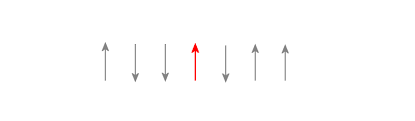
We are going to randomly grab spin (Let’s say the red one from the picture. Not only do we need that index, but we need the index of its closest neighbors (to the left and right of the red one).
   Pick_a_spin = randi(num_of_spins);
   spin_minus  = Pick_a_spin - 1;
   spin_pos    = Pick_a_spin + 1;
Task #3 – In equation 5.35 we sum over all possible neighbors. In just a few moments I am going to flip the red spin. Why do I only care about working with the neighbors of the red spin and not anything else?
We quickly run into a problem. Eventually I am going to pick a spin that is at either end of my chain. How am I going to handle this? I am going to use toroidal boundary conditions.

Here I show I implemented it in my code:
   if Pick_a_spin == 1
       % use Wrap around boundry conditions
       spin_minus = num_of_spins;
   end
   if Pick_a_spin == num_of_spins
       % use Wrap around boundry conditions
       spin_pos   = 1;
   end
Task #4 – Describe how the above code snippet matches toroidal boundary conditions in a sentence or two.
The next thing that I do is determine the energy before and after the spin flip. After this is done I calculate the change in the energy:
   % Energy change when spin flips
   EH_final    = H_field * spins (Pick_a_spin) * (-1);
   EH_initial  = H_field * spins (Pick_a_spin);

   % Energy of pair interactions
   EJ_final_m  = J * (spins(Pick_a_spin) * spins(spin_minus) * (-1));
   EJ_final_p  = J * (spins(Pick_a_spin) * spins(spin_pos) * (-1));
   EJ_init_m   = J * (spins(Pick_a_spin) * spins(spin_minus));
   EJ_init_p   = J * (spins(Pick_a_spin) * spins(spin_pos));

   % Determine the change in energy
   dE = EH_final + EJ_final_m + EJ_final_p - EH_initial - EJ_init_m - EJ_init_p;
Task #5 – Connect each line of this work to Equation 5.35.
Then next part if super important. This is where the stat mech happens. If the energy difference is negative then the energy-state is more favorable and the spin flips (i.e., itself * -1). If the energy difference is positive, it only flips if has the thermal energy to do so: P = exp (dE / kT).
   % if the energy is negative flip the spin
   if dE < 0
       spins(Pick_a_spin) = -1 * spins(Pick_a_spin);


   else
       prob     = exp(-beta * dE); %Prob of spin flip
       myRand   = rand;            %Get a randon number from 0 to 1
       if myRand < prob            %Flip that spin
           spins(Pick_a_spin) = -1 * spins(Pick_a_spin);
       end
   end
Task #6 – walk through this algorithm line by line and explain what is happening.
In the final step, I display my results with the rectangle function. I am basically drawing different rectangles for each spin and changing the color depending on the state.
The “drawnow” function is important. Matlab doesn’t want stow you every change in the graph, because that takes time and Matlab wants to be efficient. So if we want to see it step-by-step we have to tell it.
    %% Plot
    for kk = 1:num_of_spins
        if spins(kk) == 1
            c = 'r';
        else
            c = 'w';
        end
        rectangle('Position', [kk-1 0 1 1], 'facecolor', c);
    end

    drawnow
Here is the output of the code:


Here is the code:
% 1D Ising Model see 5.5.3 in textbook

num_of_spins = 10;     % Number of spins
num_of_flips = 100;    % Number of flips
H_field      = 0;      % External H-field
KT           = 0.1;    % Temperatue
J            = -1;      % Spin pair coupling term

% find beta
beta         = 1/KT;   % beta = 1 / kT

% Randomize spins, -1 or 1
%spins = 2*randi(2,num_of_spins,1)-3;
spins = ones(num_of_spins,1);

% start flipping spins randomly
for ff = 1:num_of_flips

   Pick_a_spin = randi(num_of_spins);
   spin_minus  = Pick_a_spin - 1;
   spin_pos    = Pick_a_spin + 1;

   if Pick_a_spin == 1
       % use Wrap around boundry conditions
       spin_minus = num_of_spins;
   end
   if Pick_a_spin == num_of_spins
       % use Wrap around boundry conditions
       spin_pos   = 1;
   end


   % Energy change when spin flips
   EH_final    = H_field * spins (Pick_a_spin) * (-1);
   EH_initial  = H_field * spins (Pick_a_spin);

   % Energy of pair interactions
   EJ_final_m  = J * (spins(Pick_a_spin) * spins(spin_minus) * (-1));
   EJ_final_p  = J * (spins(Pick_a_spin) * spins(spin_pos) * (-1));
   EJ_init_m   = J * (spins(Pick_a_spin) * spins(spin_minus));
   EJ_init_p   = J * (spins(Pick_a_spin) * spins(spin_pos));

   % Determine the change in energy
   dE = EH_final + EJ_final_m + EJ_final_p - EH_initial - EJ_init_m - EJ_init_p;

   % if the energy is negative flip the spin
   if dE < 0
       spins(Pick_a_spin) = -1 * spins(Pick_a_spin);


   else
       prob     = exp(-beta * dE); %Prob of spin flip
       myRand   = rand;            %Get a randon number from 0 to 1
       if myRand < prob            %Flip that spin
           spins(Pick_a_spin) = -1 * spins(Pick_a_spin);
       end
   end


    %% Plot
    for kk = 1:num_of_spins
        if spins(kk) == 1
            c = 'r';
        else
            c = 'w';
        end
        rectangle('Position', [kk-1 0 1 1], 'facecolor', c);
    end

    drawnow

end
Task #7 – Paste the code into a script and run it. Play around with different parameters and write a paragraph about what you learned.
Extending this to 2D isn’t that bad. In fact I am going to make you do it for your mini mid-semester project. You should be able to make something like this and see what happens when the temperature is lowered to zero.
